
Član VIP
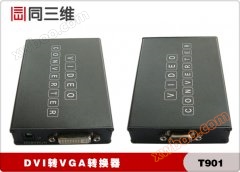
DVI-D tënë VGA Converter (kek 3D T901)
A. Product description: The same 3D T901DVI-D to VGA converter is a one-way DVI-D signal can be converted to a VGA analog signal, input signal support
Detalji proizvoda
A, Product Profile:
The same 3D T901 DVI-D to VGA converter is a single-way DVI-D signal to VGA analog signal, input signal supports computer, console, matrix and other devices. Lɔ̈ɔ̈m de DVI-I interface (ye DVI-D signal dɛ̈t ye kony), lɔ̈ɔ̈m de D-Sub interface, ye kɛ̈k ye kɛ̈k ye kɛ̈k ye kɛ̈k ye kɛ̈k ye kɛ̈k ye kɛ̈k ye kɛ̈k ye kɛ̈k ye kɛ̈k ye kɛ̈k ye kɛ̈k ye kɛ̈k ye kɛ̈k ye kɛ̈k Plug-and-use function, wala software driver ye install ye, a nɔgɔ ye luɔ̈ɔ̈i la a nɔgɔ ye luɔ̈ɔ̈i la a nɔgɔ ye luɔ̈ɔ̈i la a nɔgɔ ye luɔ̈ɔ̈i la a nɔgɔ ye luɔ̈ɔ̈i la a nɔgɔ ye luɔ̈ɔ̈i la a nɔgɔ ye luɔ̈ɔ̈i. (Note: Device kënë ye rot waar në point-to-point, ku ye rot waar në signal DVI ye gɔ̈t).
DVI-D (D = Digital) ye digital signal interface ye, a lëu bï signal ye DVI-D interface ye.
DVI-I: 4 pins next to the digital + analog DVI-I interface is the analog signal that RAMDAC turns out, when DVI-I connects DVI-D, only plays the role of DVI-D. DVI-I: 4 pins next to the digital + analog DVI-I interface is the analog signal that RAMDAC turns out, when DVI-I connects DVI-D, only plays the role of DVI-D.

II. Parameters bayanna:
① DVI-D digital signal input;
② VGA ((RGB) signal output;
③ VGA ((PC) 输出分辨率: 640* 480@60Hz 、800* 600@60Hz 、1024* 768@60Hz 、1280* 720@60Hz 、1280* 768@60Hz 、1280* 800@60Hz 、1280* 1024@60Hz 、1360* 768@60Hz 、1600* 1200@60Hz 、1920* 1080@60Hz
LED ye tɛ̈n ye tɛ̈n ye tɛ̈n ye tɛ̈n ye tɛ̈n ye tɛ̈n ye tɛ̈n ye tɛ̈n ye tɛ̈n ye tɛ̈n ye tɛ̈n ye.
②
7 7 7 7: 180g
Third, luɔɔi:
① DVI cable connects DVI input end, VGA cable connects VGA output end
② Lɔ̈k adapter de pɛɛi në DC port de kä ye looi (Note: output voltage must be 5V, too high will damage the product)
② Ka tɛmɛ ka tɛmɛ ka tɛmɛ ka tɛmɛ ka tɛmɛ ka tɛmɛ ka tɛmɛ ka tɛmɛ ka tɛmɛ ka tɛmɛ ka tɛmɛ.

4. Interface bayanna:
DV5V tënë DC5V/1A Power Adapter
RUN tɛ̈n tɛ̈n tɛ̈n tɛ̈n tɛ̈n tɛ̈n tɛ̈n tɛ̈n tɛ̈n
DVI-IN ye DVI signal source
VGA-OUT ye VGA nyuɔɔth
5. Soal ye kɔɔr:
1. DVI to VGA Converter ka lëu luui?
Fɔlɔ ye tɛmɛ ka tɛmɛ ka tɛmɛ ka tɛmɛ ka tɛmɛ ka tɛmɛ ka tɛmɛ ka tɛmɛ ka tɛmɛ ka tɛmɛ ka tɛmɛ ka tɛmɛ
2nd step check whether there is a loose line or a bad contact. 2nd step check whether there is a loose line or a bad contact. 2nd step check whether there is a loose line or a bad contact. 2nd step check whether there is a loose line or a bad contact.
Na yïn tɛ̈n lëu ba ye nyuɔɔth, ka tɛ̈n tɛ̈n tɛ̈n tɛ̈n tɛ̈n tɛ̈n tɛ̈n tɛ̈n tɛ̈n tɛ̈n tɛ̈n tɛ
2. Ye tɛ̈n yenë tɛ̈n yenë tɛ̈n yenë tɛ̈n yenë tɛ̈n yenë tɛ̈n yenë tɛ̈n yenë tɛ̈n yenë tɛ
Lɔ̈k ba tɛ̈n ye tɛ̈n ye tɛ̈n ye tɛ̈n ye tɛ̈n ye tɛ̈n ye tɛ̈n ye tɛ̈n ye tɛ̈n.
Hotline de thiëëc de käke: .
Aplikasi Produk
A be tɔ̈u në luɔɔi juëc yiic de video engineering de HD, a ka looi në banki, transport, aviation, dock, power, security, human defense, etc. command scheduling system, TV conference call, online teaching broadcast, LED large screen display system, etc. Hotline de thiëëc de käke: .
Онлайн разпит
-
Kontakti
-
Kompanija
-
Telefon
-
E-mail
-
WeChat
-
Kod provjere
-
Сједност поруки
-