
Član VIP

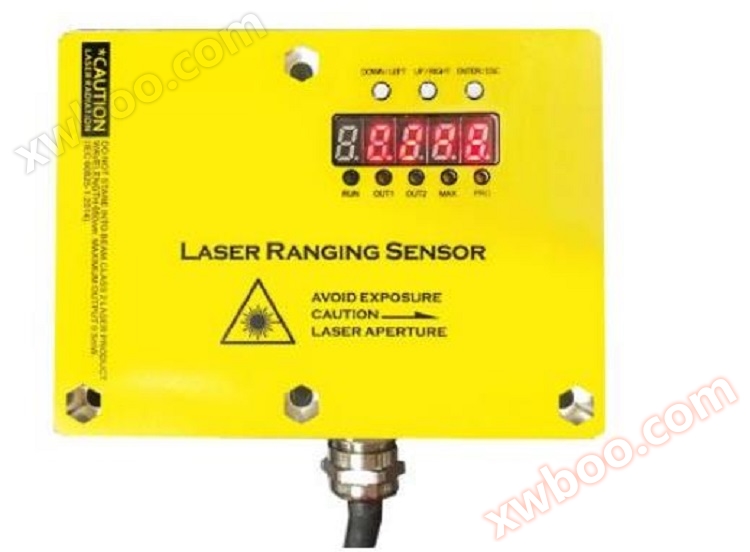
Sensor de distance laser de fréquence élevée DOB-TLS/L1
Sensor de distance laser de fréquence élevée DOB-TLS/L1
Detalji proizvoda
I. Bayan
Funksiɔn Basic
Ka tɛmɛ, ka tɛmɛ, ka tɛmɛ, ka tɛmɛ, ka tɛmɛ, ka tɛmɛ, ka tɛmɛ, ka tɛmɛ, ka tɛmɛ
3cm absolute precision (5cm absolute precision at weak reflectance, 7cm absolute precision at extreme weak reflectance) (3cm absolute precision at weak reflectance, 5cm absolute precision at extreme weak reflectance, 7cm absolute precision at extreme weak reflectance)
Digital tubes ye tɛ̈n ye tɛ̈n ye tɛ̈n ye tɛ̈n ye tɛ̈n ye tɛ̈n ye tɛ̈n ye tɛ̈n ye tɛ̈n ye tɛ̈n ye tɛ̈n ye tɛ̈n ye tɛ̈n ye tɛ̈n
LED Status Display
4-20mA analog output
100Hz ye tɛmɛ
2 relay output (NPN/PNP ye kony), lëu bï yïn ya tɛ̈n yenë yïn ya tɛ̈n yenë yïn ya tɛ̈n yenë yïn ya tɛ̈n yenë yïn
Kɔɔr distance correction
Parametre wɛɛr
Modes juëc ye luɔɔi juëc ye kony
RS485 interface, ye Modbus RTU protocol kony
Parameters Elektronik
1)Limit value, anti-polarity protection when operating in a circuit with short circuit protection: maximum8 A.
2)Kɛ kuiTLS-xxxx:UV > 15 V.
3)Wala ka tɔ̈ɔ̈u wala ka tɔ̈ɔ̈uUVTolerance.
4)No load ye.
Kuen
|
Range de mesure |
0-5M, 0-10M, 0-15M, 0-20M, 0-30M |
|
Measuring objects (Kɔl awowa) |
awowa laayɛ |
|
Resolution |
1mm |
|
Precision |
Precision1.5 mm+d 0.5‰ |
√ Range can be set, maximum30Mi
√ Digital tube displays real-time measurement results
√LED yeStatus nyuɔɔth
√ Voltage analog output
√ Limit relay output (support)NPN/PNP)
√ Ajuiɛɛr dɔ̈ɔ̈r dɔ̈ɔ̈r dɔ̈ɔ̈r dɔ̈ɔ̈r dɔ̈ɔ̈r dɔ̈ɔ̈r
√ Parameters ye looi
√RS485Interface, kuɛlModbu RTUKontrol.
|
Frekuens |
5Hz,10Hz, 20Hz, 30Hz |
|
Waktu output |
≥4 ms6) |
|
Lɛɛr |
Laser kuɛl |
|
Laser ye |
1 (IEC 60825-1:2014, EN 60825-1:2014)7) |
|
Typical Optical Dimension Distance () |
15 mm x 15 mm (10 m) |
|
Funksiɔn wɛr |
A lëu bï ya tɔ̈ɔ̈u në sliding average: Fast/Lɛɛr,Switch mode: Distance object((dto),Digital output lëu bï ya nyuɔɔth, parameterize ku reverse,Ajuiɛɛr de retardation,Tutorial, parametric setting, reversible analog output,Multi-function input: Laser off/外部示教/Disable,Gäm Display,Lɔ̈k tɛ̈n tɛ̈n tɛ̈n tɛ̈n tɛ̈n tɛ̈n tɛ̈n tɛ̈n tɛ̈n,Lock user interface |
|
Ajuiɛɛr ye laser tɔ̈u thïn (25°C) |
100,000 h |
1)A kɛ1 σ.
2) 6% . .. 90%Reflection.
3)A leŋ tɛ̈n yenë wɛ̈t ye looi: Quick/Lɛɛr.
4) 90%Reflection.
5)Lɔ̈k kä ye kek tɔ̈ɔ̈u kä ye kek tɔ̈ɔ̈u kä ye kek tɔ̈ɔ̈u kä ye kek tɔ̈ɔ̈u.
6)Ka tɛmɛ ka yɛlɛma ka tɛmɛ ka tɛmɛ ka tɛmɛ ka tɛmɛ ka tɛmɛ ka tɛmɛ ka tɛmɛ ka tɛmɛ ka tɛmɛ.
7)Wave length:658 nmPuɔth:120 mWPulse duration:2.5 ns; Rate of contact:1/400.
|
Dijital output |
|
|
|
|
Nomor |
1 1) 2) 3) |
|
|
Yaa |
PNP,NPNWalisa |
|
|
Max output current yeƔɛnA |
≤100 mA |
|
Analog output |
|
|
|
|
Nomor |
1 |
|
|
Yaa |
Voltage/Current output ye gam |
|
|
Voltage/Current ye |
0V-10V/4mA-20mA,≤300Ω |
|
|
Resolution |
12bit |
|
Multi-function input(MF) |
|
1 x3) 4) |
|
Dɔŋ |
|
10mm. ..1000mm |
Interface
Parameters wɛɛngɛ
|
Temperature ɣän ɣän ɣän ɣän ɣän ɣän ɣän ɣän ɣän ɣän ɣän ɣän ɣän ɣän ɣän ɣän ɣän ɣän ɣän ɣän ɣän ɣän ɣän ɣän ɣän ɣän ɣän |
–15 °C. .. +50°C |
|
Temperature ɣän tɔ̈ɔ̈u |
–20 °C. .. +60°C |
|
Maximum relative humidity of air (non-condensing) ye cɔl air humidity ye cɔl air humidity ye cɔl air humidity ye cɔl air humidity ye cɔl air humidity ye cɔl air humidity ye cɔl air humidity |
≤85 % |
|
Type resistant ambient light capacity |
40,000 lx |
|
Anti-vibration |
EN 60068-2-6, EN 60068-2-64 |
|
Kapasitet anti-impact |
EN 60068-2-27 |
Lɔnadɛ
Kä ye kɛ̈n ye kɛ̈n ye kɛ̈n ye kɛ̈n ye kɛ̈n ye kɛ̈n ye kɛ̈n ye kɛ̈n ye kɛ̈nLED yeLamp ye nyuɔɔth ku key ye looi. Digital TubeLED ye
Lampu ye nyuɔɔth bɛ̈n looi bɛ̈n looi bɛ̈n looi bɛ̈n looi bɛ̈n looi bɛ̈n looi bɛ̈n looi bɛ̈n looi
LED ye
Produk kënë5 LED lamps are used to show the basic condition of the product, see the detailed description below. 5 LED lamps are used to show the basic condition of the product, see the detailed description below. 5 LED lamps are used to show the basic condition of the product, see the detailed description below.
|
Nyuɔ |
Role |
Description |
|
RUN |
Laser sensor tɛ̈n |
LED ye tɛ̈n ye tɛ̈n ye tɛ̈n ye tɛ̈n ye tɛ̈n ye tɛ̈n ye tɛ̈n ye tɛ̈n ye tɛ̈n ye |
|
OUT |
Nyuɔ̈th relay output status |
Na cï bɛ̈n looi, relay drive output,LED bɛ̈ɛ̈r; Lamp dɔ̈ɔ̈ŋ tɛ̈n tɛ̈n tɛ̈n tɛ̈n tɛ̈n tɛ̈n tɛ̈n tɛ̈n |
|
MAX |
Nyuɔ̈th a tɛ̈n ye tɛ̈n ye tɛ̈n ye tɛ̈n ye tɛ̈n ye tɛ̈n ye tɛ̈n ye tɛ̈n |
N'a tɛmɛ tɛmɛ tɛmɛ tɛmɛ tɛmɛ tɛmɛ tɛmɛ tɛmɛ tɛmɛ tɛmɛ tɛmɛLampu MAX |
|
Min |
A ye tɛmɛ a ye tɛmɛ a ye tɛmɛ a ye tɛmɛ a ye tɛmɛ a ye tɛmɛ a ye tɛmɛ a ye tɛmɛ0 |
N'a tɛ̈n ye tɛ̈n ye tɛ̈n ye tɛ̈n ye tɛ̈n ye tɛ̈n ye tɛ̈n ye tɛ̈nMin lamba |
|
PRO |
1. Nyuɔ̈th tɛ yen tɛ yen tɛ yen tɛ yen tɛ yen tɛ yen tɛ yen tɛ yen tɛ yen tɛ yen tɛ yen tɛ yen tɛ yen 2. Nyuɔ̈thkɛ awo tɔ̈u |
1. A raan ye luɔɔi bɛ lɔ në interface de configuration,PRO lamp always bright, configuration completed to enter the main interface PRO lamp is extinguished. PRO lamp always bright, configuration completed to enter the main interface PRO lamp is extinguished. PRO lamp always bright, configuration completed to enter the main interface PRO lamp is extinguished. 2. Ni awo dɔ ka tɛ̈n tɛ̈n tɛ̈n tɛ̈n tɛ̈n tɛ̈n tɛ̈n tɛ̈nLampu PRO |
Button
Kän ye kek tɔ̈u3 physical keys, virtual out six keys by short press and long press, respectively up, down, left, right, confirm, return. 3 physical keys, virtual out six keys by short press and long press, respectively up, down, left, right, confirm, return. 3 physical keys, virtual out six keys by short press and long press, respectively up, down, left, right, confirm, return.
|
Buton Fizikal |
Press koor |
Long Press |
Lokasi |
|
Button1 (ENTER/ESC) |
Konfirmasiyon |
Lëk |
Ka'an ka'an ka'an ka'an ka'an ka'an ka'an ka'an ka'an ka'an ka'an ka'an ka'an ka'an ka'an ka'an ka'an ka'an |
|
Button2 (UP/LEFT) |
Yüksek |
Left |
Middle |
|
Button3 (DÄN/DÄN) |
Dɔɔr |
Dɛɛr |
Dɛɛr |
Lëk:
1. Ka tɛ̈ɛ̈m ka tɛ̈ɛ̈m ka tɛ̈ɛ̈m ka tɛ̈ɛ̈m ka tɛ̈ɛ̈m ka tɛ̈ɛ̈m
2. Short press is under finger (Kɔrɔ-kɔrɔ-kɔrɔ-kɔrɔ-kɔrɔ-kɔrɔ-kɔrɔ-kɔrɔ-kɔrɔ)0.2 ~ 0.5 sekond ka bɛ̈n looi; A ye tɛ̈n ye tɛ̈n ye tɛ̈n ye tɛ̈n ye tɛ̈n ye 0.5 seconds
Digital Tube
Produk kënë5 8 segment digital tubes as a display interface, digital tubes can display numbers and English letters, with a button cooperation can complete product information display and parameter setting functions. 5 segment digital tubes as a display interface, digital tubes can display numbers and English letters, with a button cooperation can complete product information display and parameter setting functions. 5 segment digital tubes as a display interface, digital tubes can display numbers and English letters, with a button cooperation can complete Dijital tube ye nyuɔɔth, tïŋ Appendix A.
Diagram1 a nyuɔth luɔɔi de interface de käke käke käke käke käke käke käke käke käke käke käke käke käke käke käke käke käke käke käke käke käke käke käke käke käke käke käke
Ka tɛmɛ ka tɛmɛ ka tɛmɛ ka tɛmɛ ka tɛmɛ ka tɛmɛ ka tɛmɛ ka tɛmɛ ka tɛmɛ ka tɛmɛ ka tɛmɛ ka tɛmɛ. Ni aw tɛmɛNa ENTER, lɔ menu selection interface; Në menu select interface, ye sub-menu switch ka tɔ̈ɔ̈u ka tɔ̈ɔ̈u ka tɔ̈ɔ̈u ka tɔ̈ɔ̈u ka tɔ̈ɔ̈u ka tɔ̈ɔ̈u ka tɔ̈ɔ̈u ka tɔ̈ɔ̈u Lɔ̈k ESC button në menu selection interface, ku lɔ̈k main interface.
Në sub-menu interface, ka tɔ̈u piny, ka tɔ̈u piny, ka tɔ̈u piny, ka tɔ̈u piny, ka tɔ̈u piny, ka tɔ̈u piny, ka tɔ̈u pinyENTER wala ESC bɛ̈n lɔ̈ɔ̈m në menu selection interface (ni yïn ye ENTER tɔ̈ɔ̈u bï yɛl ya tɔ̈ɔ̈u, wala ni yïn ye ESC tɔ̈ɔ̈u bï yɛl ya tɔ̈ɔ̈u).

Main Interface
YɛlInterface for measurement results displays the interface for measurement results, showing the current measurement results, units are metres, after decimal points. Interface for measurement results displays the interface for measurement results, showing the current measurement results, units are metres, after decimal points.3 ye.
Lɔ̈k ye raan ye raan ye raan ye raan ye raan ye raan ye raan ye raan ye raan ye raan ye raan ye raan ye raan ye raan ye raan ye raan ye raan ye raan ye raanENTER ye rot looi në menu selection interface. Lɔ̈k ESC në menu selection interface ba lɔ̈k në main interface.
Zero bit correction
Yök në menu selection interface në top-down keyCALIB, Lɩt ENTER tɛ̈n nɛy tɛ̈n nɛy tɛ̈n nɛy tɛ̈n nɛy tɛ̈n nɛy tɛ̈n nɛy tɛ̈n Loktu kënë, interface ye data cï gɛɛr ye nyuɔɔth, ku ka data cï gɛɛr ye yɔ̈ɔ̈r ye yɔ̈ɔ̈r ye yɔ̈ɔ̈r ye yɔ̈ɔ̈r ye yɔ̈ɔ̈r ye.
Lɔ̈k kä ye kek looi në tɛ̈n yenë kek looi në tɛ̈n yenë kek looi në tɛ̈n yenë kek looi në tɛ̈n yenë kek looi në tɛ̈n yenë kek looi1 m) Lɔ̈k kä ye kɛ̈ɛ̈k ye kɛ̈ɛ̈k ye kɛ̈ɛ̈k ye kɛ̈ɛ̈k ye. Ka kɛ̈ɛ̈r ye kɛ̈ɛ̈r ye kɛ̈ɛ̈r ye kɛ̈ɛ̈r ye kɛ̈ɛ̈r ye kɛ̈ɛ̈r ye kɛ̈ɛ̈r ye kɛ̈ɛ̈ Up & Down key ye kalibration value juak wala tɔ̈ɔ̈u; Lɔ̈ɔ̈m ye cɔl left and right ye kɛ̈ɛ̈r ye cɔl calibration value ye juak wala ye dɔ̈ɔ̈r, ku lamba ye cɔl calibration value ye cɔl calibration value ye cɔl calibration value.
Na cï correction tamat, pressENTER bɛ kunnafoniw tɔ̈u yen tɔ̈u yen tɔ̈u yen tɔ̈u yen tɔ̈u yen tɔ̈u yen tɔ̈u yen tɔ̈u yen tɔ̈u yen. Në ye thaa kënë, yïn alëu ba kä ye kek gɛɛi ya waar në kë de kä ye kek gɛɛi ya waar në kë de kä ye kek gɛɛi ya waar në kë de kä ye kek gɛɛi. Na yï ENTER dɔ̈ɔ̈r dɔ̈ɔ̈r dɔ̈ɔ̈r dɔ̈ɔ̈r dɔ̈ɔ̈r dɔ̈ɔ̈r dɔ̈ɔ̈r dɔ̈ Na yïn ye ESC tɔ̈ɔ̈u, yï bɛ̈n yɔ̈ɔ̈r ba yɔ̈ɔ̈r ba yɔ̈ɔ̈r ba yɔ̈ɔ̈r ba yɔ̈ɔ̈r.
Sample Mode Setup
Walasa ka tɛmɛ tɛmɛ tɛmɛ tɛmɛ tɛmɛ tɛmɛ tɛmɛ tɛmɛ tɛmɛ tɛmɛ tɛmɛ tɛmɛ4 model sampling.
Slow mode ye kɛ̈ɛ̈r ye kɛ̈ɛ̈r ye kɛ̈ɛ̈r ye kɛ̈ɛ̈r ye kɛ̈ɛ̈r ye kɛ̈ɛ̈r ye kɛ̈ɛ̈r Modèle rapide est utilisé pour mesurer objets qui se déplacent rapidement, caractérisé par la rapidité de réponse et la précision de mesure réduite.
|
Sample Mode |
Data sampling frequency |
Calculate the number of data used (Lɔ̈ɔ̈m de data ye luɔ̈ɔ̈i) |
|
Lɛɛr (1.LƐLƐ) |
5Hz |
8 |
|
Normal (2.NORM) |
10Hz |
8 |
|
Rapid1 (3.FST1) |
20Hz |
4 |
|
Rapid2 (4.FST2) |
30Hz |
2 |
Sampling Mode bayanna
Tʋma Mode Setup
Kä ye kek looi aye kony bï relay alarm output ya tɔ̈ɔ̈u. Ka tɛmɛ tɛmɛ tɛmɛ tɛmɛ tɛmɛ tɛmɛ tɛmɛ tɛmɛ tɛmɛ tɛmɛ tɛmɛ tɛmɛ tɛmɛ tɛm Na tɛ̈n yenë tɛ̈n yenë tɛ̈n yenë tɛ̈n yenë tɛ̈n yenë tɛ̈n yenë tɛ̈n yenë tɛ̈n yenë tɛ̈n yenë tɛ̈n yenë tɛ̈n
|
Tʋma Mode |
Limit Normal |
Limit Normal Range |
|
Modɛl1 (1.mod1) |
0 |
Limit3 (Limit3) |
|
Modɛl2 (2.mod2) |
Limit2 (Limit2) |
Limit3 (Limit3) |
|
Modɛl3 (3.mod3) |
((limit1+limit2) /2 |
((limit2+limit3) /2 |
Description de mode de travail

Tɛ̈n yenë yïn wïc yɔ̈ɔ̈r yɔ̈ɔ̈r yɔ̈ɔ̈r yɔ̈ɔ̈r yɔ̈ɔ̈r yɔ̈ɔ̈r yɔ̈ɔ̈r yɔ̈ɔ̈rENTER confirm ye waar. Na yïn fɛ̈ɛ̈r ba yɛl lɔ̈ɔ̈m, aw bɛ ESC tɔ̈ɔ̈u ba lɔ̈ɔ̈m në menu selection interface.
Lëk: Limit1, Limit2, Limit3, Limit3, Limit3, Limit3, Limit1
2. Na limit1, limit2, limit3 ka tɔ̈u ka tɔ̈u ka tɔ̈u ka tɔ̈u ka tɔ̈u ka tɔ̈u ka tɔ̈u ka tɔ̈u ka tɔ̈u ka tɔ̈u ka tɔ̈u ka tɔ̈u
Limit setup
KaMenu Select Interface Select Enter Limit Setting Interface, ye3 limits parameters can be set, based on the working mode to decide which limits parameters to set. 3 limits parameters can be set, based on the working mode to decide which limits parameters to set.
Lɔ̈k parameter limit ye tɔ̈ɔ̈u në tɛ̈n yii: tɛ̈n ye tɔ̈ɔ̈u në tɛ̈n ye tɔ̈ɔ̈u në tɛ̈n ye tɔ̈ɔ̈u në tɛ̈
Phase of initial value selection (Phase of initial value selection)
Limit parameters fɔlɔ wɛ lëu bï ya tɔ̈ɔ̈u në käke atat: System configuration, current measurement results, zero
A sɔrɔ ka tɛmɛ ka tɛmɛ ka tɛmɛ ka tɛmɛ ka tɛmɛ ka tɛmɛ ka tɛmɛ ka tɛmɛ ka tɛmɛ ka tɛmɛ ka tɛmɛ ka tɛmɛ. Lɛ̈k yenENTER, Select the system configuration as the initial value of the fine-tuning and go to the fine-tuning phase. Sɔrɔ ka tɛmɛ ka tɛmɛ ka tɛmɛ ka tɛmɛ ka tɛmɛ ka tɛmɛ ka tɛmɛ I-click the top button (or left button) ka tɛmɛ ka tɛmɛ ka tɛmɛ ka tɛmɛ ka tɛmɛ ka tɛmɛ ka tɛmɛ ka tɛmɛ ka tɛmɛ ka tɛmɛ ka tɛmɛ ka tɛmɛ Lɔ'u ka tɛmɛ (wala ka tɛmɛ) ka tɛmɛ Zero ye fɔlɔ ye ka tɛmɛ ka tɛmɛ ka tɛmɛ ka tɛmɛ ka tɛmɛ ka tɛmɛ ka tɛmɛ.
Phase of fine-tuning
Në ye thaa de limiting fine-tuning, ka limiting size ya waar në upper and lower keys, ka limiting amplitude ya waar në left and right keys.
Ka tɛmɛ ka tɛmɛ ka tɛmɛ ka tɛmɛ ka tɛmɛ ka tɛmɛ ka tɛmɛ ka tɛmɛ ka tɛmɛENTER Save your changes and return to the menu selection interface. ENTER Save your changes and return to the menu selection interface. ENTER Save your changes and return to the menu selection interface. ENTER Save your changes and return to the menu selection interface. Lɔ̈k ESC bɛ̈ɛ̈i bɛ̈ɛ̈i bɛ̈ɛ̈i bɛ̈ɛ̈i bɛ̈ɛ̈i bɛ̈ɛ̈i bɛ̈ɛ̈i. Na yïn wïc tɛ̈n ba wɛ̈ɛ̈r dɔ̈t looi, yï bɛ̈n ya tɔ̈ɔ̈u ba wɛ̈ɛ̈r dɔ̈t looi, ku yï bɛ̈n ya tɔ̈ɔ̈u.
Kɔmpiye
Kä ye kek looi alëu bï kek ya tɔ̈ɔ̈u në kë wïc. A ye dɛmɛ tɛmɛ tɛmɛ tɛmɛ tɛmɛ tɛmɛ tɛmɛ tɛmɛ tɛmɛ tɛmɛ tɛmɛ 1m, 3m, 5m, 10m, 15m, 20m ku 30m. Analog output full scale corresponds to 10V output, 0m corresponds to 0V output.
Go to the range setting interface in the menu selection interface, and select a different range by using the up and down keys. Go to the range setting interface in the menu selection interface, and choose a different range by using the up and down keys. Go to the range setting interface in the menu selection interface, and choose a different range by using the up and down keys. DɛkENTER Save your changes and return to the menu selection interface. ENTER Save your changes and return to the menu selection interface. ENTER Save your changes and return to the menu selection interface. ENTER Save your changes and return to the menu selection interface. Lɔ̈k ESC bï yɛl waar ku lɔ̈k menu selection interface.
Lɔ̈k tɛ̈n tɛ̈n tɛ̈n tɛ̈n tɛ̈n tɛ̈n tɛ̈n tɛ̈n tɛ̈n
Në menu kuanycök interface kuanycök në Restore Factory Settings interface, nëLɔ̈k kam YES ku NO. N'a sɔrɔ YES, ka Enter tɔ̈ɔ̈u bï yen tɛ̈n yenë yen tɛ̈n yenë yen tɛ̈n yenë yen tɛ̈n yenë yen tɛ̈n yenë yen tɛ̈n yenë yen tɛ Na yɔ̈ɔ̈r ba ENTER wala ESC tɔ̈ɔ̈u ba lɔ̈ɔ̈m në menu selection interface.
Start telin
N'a fãa, y tõe n'a tɔ̈ɔ̈u ka tɛ̈n tɔ̈u ka tɛ̈n tɔ̈u ka tɛ̈n tɔ̈u ka tɛ̈n
1. Kɔmpiye
2. Zero-bit kalibrasiɔn
3. Setup sampling mode
4. Lɔ̈k luɔi mode ku limit
5. Installation test voltage simulation output and relay drive output (Lɔ̈ɔ̈i ë tɛ̈n ë tɛ̈n ë tɛ̈n ë tɛ̈n ë tɛ̈n ë tɛ̈n ë tɛ̈n ë tɛ̈n ë tɛ̈n ë tɛ̈n ë tɛ̈n ë tɛ̈n ë tɛ̈n ë tɛ̈n ë tɛ̈n ë
Laser Distance Sensor Product Application: Laser Distance Sensor Product Application: Laser Distance Sensor Product Application: Laser Distance Sensor Product Application: Laser Distance Sensor Product Application: Laser Distance Sensor Product Application:
● Ka tɛmɛ, ka tɛmɛ, ka tɛmɛ, ka tɛmɛ, ka tɛmɛ, ka tɛmɛ, ka tɛmɛ, ka tɛmɛ, ka tɛmɛ, ka tɛmɛ, ka tɛmɛ, ka tɛmɛ
● Kɔɔr tɛ̈n yenë kɔɔr cɔl solid, liquid, anti-corrosion materials, radiation objects tɔ̈u thïn
● Kɛ̈ɛ̈r kä ye kek tɛ̈n yenë kek tɛ̈n yenë kek tɛ̈n yenë kek tɛ̈n yenë kek tɛ̈n yenë kek tɛ̈n yenë kek tɛ̈n yenë kek t
● Bridge static flexure online (wireless) monitoring system
● Tunnel total deformation online (wireless) monitoring system, tunnel key point deformation online (wireless) monitoring system
● Balance monitoring system
● Thickness Dimension Monitoring System
● Mining elevator, hydraulic piston height monitoring, positioning monitoring system
Онлайн разпит
-
Kontakti
-
Kompanija
-
Telefon
-
E-mail
-
WeChat
-
Kod provjere
-
Сједност поруки
-